
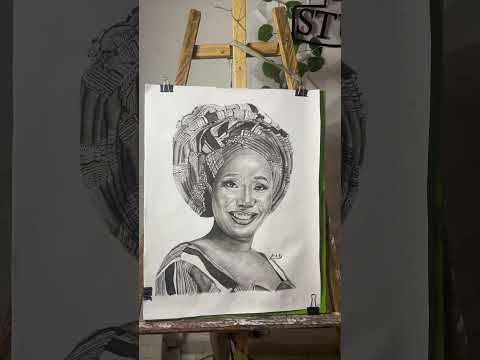
In 2019 I started Beo Art Studio. Portraits in pencil and oil paintings, murals, live event painting, SFX makeup, fabric art. Over the years I've been exhibited at FAME 2022, 2023, and 2025, painted a feature wall mural at Doncont Hotel Yenagoa, and done installations at Silhouette Fitness Centre in Yenagoa. Art has been my full business and not a hobby.
And the question I kept hearing from clients, more than any other question, was this: "Can I see what it will look like first?"
The Question That Started Everything
It makes complete sense when you think about it. A portrait commission is personal. The client is going to live with this piece. They're going to frame, gift or hang it somewhere that matters. They want to feel confident before they pay.
I could show them my portfolio. I could describe the process, explain how charcoal creates depth differently from pencil, walk them through what to expect. But until they could see their own face in the style they were considering, there was always a gap. A moment of faith they had to take without quite enough information.
I wanted to close that gap.
How I Already Solved It for Murals
For my mural work, I'd already built a solution. The Mural Visualizer tool on Beo Art Studio lets me upload a photo of a wall space and show a client exactly what their mural would look like on their actual wall before paint goes on it. It changed how I sell mural commissions completely. The conversation goes from "trust me" to "here's what you're getting" and that shift is everything in a creative services business.
I wanted the same thing for portrait work. A tool that could take a client's photo and show them quickly and convincingly, what their commissioned piece might look like in whatever style they were considering.
What I found when I looked for that tool was that it didn't exist the way I needed it to.
What I Tested and Why It Wasn't Enough
I went through everything I could find. Canva's sketch effects are templated, useful for social graphics, not for portrait previewing. The output doesn't look like the person in any meaningful way, it looks like a photo with a filter on it. A client looking at that wouldn't feel confident about a commission, they'd feel confused.
The preset-based converters, and there are dozens of them, mostly share the same core problem: upload your face, get back a face that's approximately like yours but not exactly like yours. As a portrait artist who spends hours studying faces, I could see it immediately. If a tool can't maintain accurate character consistency, it can't serve as a commission preview. It would create more uncertainty, not less.
None of them had a prompt field that lets you say anything about what you wanted. You uploaded, you received, you accepted. For a creative preview tool that's completely backwards, the whole point is to explore possibilities, not receive a fixed output.
So I Built It
I built Beo Art Studio Photo to Sketch powered by Gemini AI with character consistency as the non-negotiable foundation. Your face in, your face out, accurately rendered in whichever style you choose. Not approximately you. Actually you.
Six styles: pencil sketch, charcoal art, ink art, line drawing, painting, and anime. Each one a genuinely distinct output, not the same processing with a different color grade. I chose these six because they represent the range of what clients actually ask about when they're considering a commission.
The prompt field was the feature I was most deliberate about adding. After selecting a style, you can type a specific instruction in plain language and the tool uses it. I tested it myself with a prompt to render me in Renaissance-era dress and setting, the output placed me in that world completely. Period clothing, period composition, period mood. That's not filtering, that's creative direction. That's what I wanted a client to be able to do: say "I want to look like this" and actually see it.

I also tested the anime style with a prompt to make me look like a Naruto character. I'm an artist who's studied portraiture seriously for years and I was genuinely shocked by how well it worked. It didn't put a cartoon overlay on my face, it reinterpreted me in that visual language. The proportions, the linework, the energy, all of it translated.

What the Tool Does That I Can't Do by Hand and What It Can't Replace
I want to be honest about this because I think it matters.
The AI gives you clean, accurate output in seconds. Character consistency, style accuracy, shareable immediately with no watermark. For a preview tool, for a creative exploration tool, for someone who wants to turn a photo into something worth keeping it's exceptional at what it does.
But handmade art gives the artist something the AI doesn't have: judgment in every moment. When I'm drawing a portrait by hand, I'm making hundreds of small decisions. I choose where a shadow falls, how heavily to press on the charcoal, which details to emphasise and which to simplify. I can add and subtract freely. I can respond to what I'm seeing as I go. The drawing evolves.
AI gives you clean lines and accurate character but it's a one or two shot process. You take the output as it comes. It's impressive, I'll say that again because I mean it, but it's a different thing from what happens when an artist spends hours with your face.
The tool was never meant to replace that. It was meant to give people the confidence to commission it.
What Happened After I Launched
I expected the tool to be useful for my own clients. What I didn't expect was 200 active guest users every month without significant promotion. People putting through their dogs, their houses, family portraits, childhood photos. Someone on Nairaland wrote about it unprompted, tested it on a selfie, an old childhood photo, and product pictures, and described the output as something you'd frame or use as a gift. I didn't ask for that review. It just appeared.
The use cases I've seen have expanded my understanding of who this is for. It's not just artists and their clients. It's anyone with a photo that means something to them who wants to see it become something more. That's a much larger group of people than I originally built it for.
I've also learned from watching people use it that the prompt field is more powerful than most users initially realise. Most people leave it blank the first time. The ones who come back experiment with it, and that's when the outputs start becoming genuinely personal and surprising.
Try It Free
The guest trial requires no signup, one generation, no watermark, so you can see exactly what the tool does with your photo before you decide anything. Sign up and you get two additional free credits plus a dashboard where every generation is saved permanently.
Go to beoarts.com/p/photo-to-sketch-online.html, upload your photo, and see what comes back. If it gives you the same feeling it gives my clients — that shift from uncertainty to confidence about what something could look like — then it's doing exactly what I built it for.
And if you try the prompt field and get something that genuinely surprises you, I'd actually like to hear about it in the comments bellow.
 @_beoarts on Instagram







0 Comments